
Activate the Entire Pack Once
Scan any label in the purchased pack, enter and verify your email, and TapNota connects the whole pack to your account.
You do not activate every label separately.

Track tools, equipment, supplies, storage, kits, backstock, and shared assets with NFC or QR tags. TapNota connects every physical item to a searchable digital record with photos, notes, status, history, AI-assisted identification, and shared account access.
TapNota is designed for the moment someone is standing in front of the item, bin, tool, kit, shelf, or asset. The tag becomes the fastest route into the record, while the Portal gives you the larger inventory view.
Instead of separating labels, notes, photos, and history into different systems, TapNota keeps them connected to the item itself.
Use NFC, QR, or a pre-coded TapNota label on equipment, storage, tools, assets, kits, shelves, or supplies.
Tap NFC or scan QR with a phone to reach the connected Item Page without installing a separate app.
Save photos, notes, status, quantities, location, activity history, folders, privacy settings, and other details.
Search across tagged inventory, review item status, open records, and keep shared inventory organized as it grows.
TapNota combines direct tag access with a searchable account dashboard. That means you can work from the physical item when you are in the field, then manage the larger inventory from your phone or computer.
Use one dashboard to find, organize, and open the tagged inventory connected to your account.
When a bin, kit, shelf, or workspace contains several items, manually typing every object can slow down inventory setup. Identify with AI can analyze a photo and return a useful item list while you are working with the connected record.
Shared Account Access lets invited users sign in with their own TapNota login and work inside the same inventory. It is designed for businesses, teams, families, and other groups that need shared visibility without passing around one account credential.
TapNota is built around item identity and history, not just a quantity field. That makes it useful when inventory needs context, condition, location, ownership, notes, or accountability.
Keep visual documentation, descriptions, quantities, instructions, service information, and item-specific notes together.
Use status to make it easier to tell what is active, stored, moved, sold, donated, retired, or otherwise changed.
Keep important updates and item history visible instead of overwriting the context that existed before.
Choose Private, Share, or Public visibility for Item Pages and add optional PIN protection when another layer of control is useful.
Share a specific Item Page when needed without granting someone access to your entire TapNota account.
If a label is damaged, export and reprint the same QR code while keeping the existing digital record intact.
Group inventory by team, project, location, room, customer, category, job, storage area, or any structure that fits your workflow.
Search item names, notes, folders, and tag codes from the Portal instead of physically checking every labeled item.
Use TapNota from a phone, tablet, or computer through the web instead of requiring every user to install a dedicated app.
TapNota works especially well when the inventory is physical, distributed, stored in bins or kits, shared between people, or difficult to understand from a spreadsheet alone.
Track drills, ladders, generators, cases, shop equipment, and shared tools with photos, status, location, and notes.
Label shelves, bins, boxes, parts, consumables, and storage areas so people can find the right inventory faster.
Use tags on trucks, trailers, jobsite equipment, field kits, and items that move between locations.
Track electronics, shared devices, accessories, demo gear, event equipment, and other assets used by multiple people.
Document what belongs in a kit, photograph contents, add instructions, and keep history attached to the container or case.
Know what is inside a container or storage location without reopening everything just to check its contents.
TapNota is designed for teams that want the speed of scanning the item itself, while still keeping a searchable software layer behind every tag.
| Workflow | Spreadsheet / static list | TapNota |
|---|---|---|
| Open the exact item record from the physical item | Not built in | NFC or QR direct access |
| Photos, notes, status & item history | Possible, but manually structured | Built into the connected Item Page |
| Search all tagged inventory | Search the file | Search the TapNota Portal |
| AI-assisted identification | Not built in | Identify with AI while signed in |
| Separate logins for shared inventory | Depends on the file platform | Shared Account Access |
| Item privacy & PIN controls | File-level controls | Private, Share, Public + optional PIN |
| Replace a damaged QR without losing the record | Rebuild manually | Export and reprint the same QR |
Quick answers for businesses and teams comparing inventory management software, QR inventory systems, NFC tracking, and simpler ways to manage physical items.
Start with one shelf, one kit, one storage area, or one group of assets. Tag the items, build the records as you go, and let the Portal become the searchable inventory layer behind your operation.
TapNota gives you a portal view to manage all tagged inventory, recent activity, assignments, and item visibility in one place.

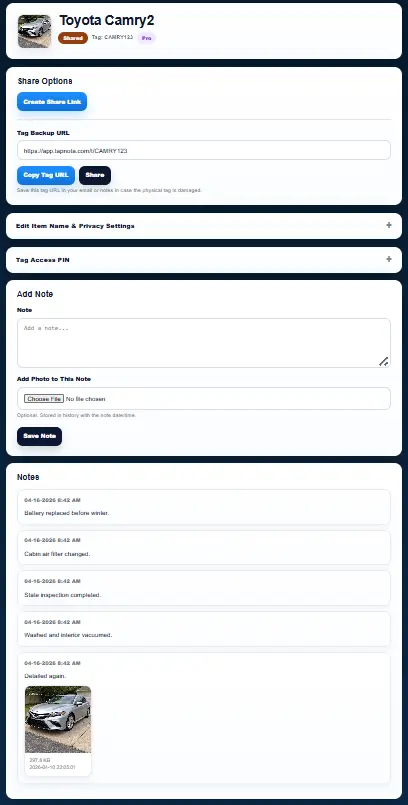
The item page is where inventory becomes easy to manage. Scan the tag to open it instantly, add notes, upload photos, share the item when needed, and keep a clean running history.
Need more labels? Buy additional TapNota pre-coded packs on Amazon. Scan one label to activate your entire pack instantly.










